Table of contents
- Setting up pre-commit for a git repo
- Using setup.py to install pre-commit hooks
- Using pre-commit-hooks for all git repos
- git commit --no-verify
- Troubleshooting
- Footnotes
- References
Setting up pre-commit for a git repo
You can run scripts before creating a commit in a git repo, i.e. pre-commit
hooks, to verify that the files you are checking in meet a predefined standard.
pre-commit is a Python package that let's you
manage and run pre-commit hooks in any git repository.

Source: [1]
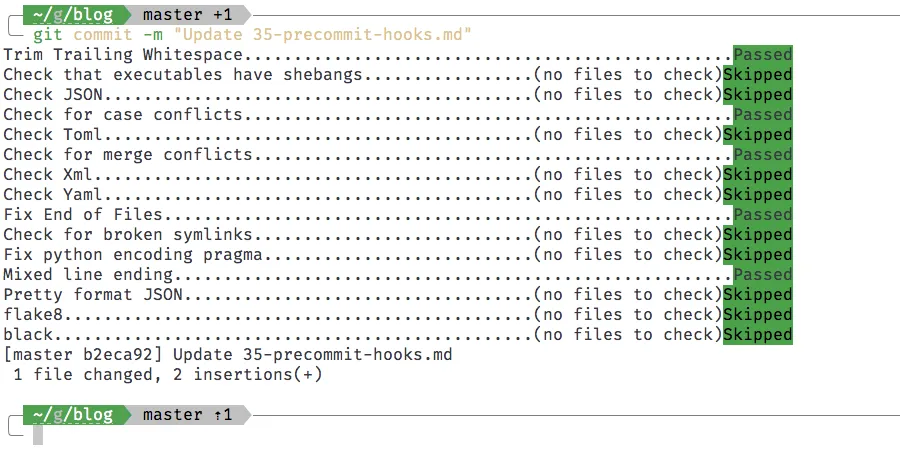
Using pre-commit requires adding a .pre-commit-config.yaml file to the git
repository, and running pre-commit install.
- Add a file called
.pre-commit-config.yamlto the root of your git repository, and add the hooks you want in that file. This is an example of a.pre-commit-config.yamlfile:# cat /path/to/gitrepos/reponame/.pre-commit-hooks.yamlrepos:- repo: https://github.com/pre-commit/pre-commit-hooksrev: v3.1.0hooks:- id: trailing-whitespace- id: check-executables-have-shebangs- id: check-json- id: check-case-conflict- id: check-toml- id: check-merge-conflict- id: check-xml- id: check-yaml- id: end-of-file-fixer- id: check-symlinks- id: fix-encoding-pragma- id: mixed-line-ending- id: pretty-format-jsonargs: [--autofix]- repo: https://gitlab.com/pycqa/flake8rev: 3.8.3hooks:- id: flake8args: ['--max-line-length=150','--ignore=E203,E402,E501,E800,W503,W391,E261','--select=B,C,E,F,W,T4,B9']- repo: https://github.com/ambv/blackrev: 19.10b0hooks:- id: blackargs: [--line-length=150, --safe] - Install
pre-commitand runpre-commit install.Terminal window pip install pre-commitpre-commit install
Using setup.py to install pre-commit hooks
You can have setup.py automatically run precommit install when setting up a
developer environment.
To do this, add a PostDevelopCommand hook to setup.py. Here's a minimal
example:
import osimport loggingfrom codecs import openfrom setuptools import setup, find_packagesfrom setuptools.command.develop import developfrom subprocess import check_callimport shlex
# Create post develop command class for hooking into the python setup process# This command will run after dependencies are installedclass PostDevelopCommand(develop):    def run(self):        try:            check_call(shlex.split("pre-commit install"))        except Exception as e:            logger.warning("Unable to run 'pre-commit install'")        develop.run(self)
install_requires = ["networkx"] # alternatively, read from `requirements.txt`extra_requires = ["pandas"]     # optional dependenciestest_requires = ["pytest"]      # test dependenciesdev_requires = ["pre-commit"]   # dev dependencies
setup(    name="packagename",    version="v0.1.0",    install_requires=install_requires,    extras_require={        "test": test_requires,        "extra": extra_requires,        "dev": test_requires + extra_requires + dev_requires,    },    cmdclass={"develop": PostDevelopCommand},)
Then, during the first time you want to start working on the project you can run the following to setup your development environment:
pip install -e ".[dev]"This will install install_requires, test_requires, extra_requires and
dev_requires dependencies. This will also run pre-commit install in the git
repository, which will add the hooks from the .pre-commit-config.yaml file.
If you don't want to automatically run pre-commit install, remove the
cmdclass={"develop": PostDevelopCommand} line in the setup(...) function
arguments.
Using pre-commit-hooks for all git repos
If you want to use pre-commit-hooks for all git repositories on your machine,
you can set up a git-templates folder that is used as a templatedir when you
run git init.
Add the following to your
~/.gitconfig
file 1.
[init] templatedir = ~/gitrepos/git-templatesNow create a ~/gitrepos/dotfiles/git-templates folder with a single folder
inside it called hooks, and with a single executable file inside the hooks
folder called pre-commit.
tree git-templatesgit-templates└── hooks ├── commit-msg └── pre-commitYou can create a text file and make it executable by running
chmod +x pre-commit. In that file, you can make pre-commit point to a
.pre-commit-config.yaml file of your choosing.
This will make git init use the templatedir as a template when you create a
new git repository.
Here is what my
git-templates/hooks/pre-commit
file looks like:
#!/bin/shpre-commit run --config ~/gitrepos/dotfiles/.pre-commit-config.yamlYou can place the .pre-commit-config.yaml wherever you like. I have mine in my
~/gitrepos/dotfiles repository. If
you have set it up correctly, the next time you run git init the pre-commit
hooks will be set up in your git repository based on the
.pre-commit-config.yaml file you set up.
git commit --no-verify
Finally, if you want to bypass the pre-commit hooks in special circumstances,
you can add the --no-verify flag to your git commit command.
git commit --no-verifyThis will run git commit without any pre-commit hooks.
Troubleshooting
You can update the .git/hooks/pre-commit file if something goes wrong, to suit
your configuration. For example, you may have to configure it to point to a
specific version of Python on your machine if it doesn't point to the correct
version by default.
You also can change the flake8 errors and warnings that you'd like to ignore
by changing the arguments to flake8. You can read about all the different
flake8 errors and warning over here: https://www.flake8rules.com/.
Footnotes
-
On Windows, the file is located at
C:\Users\USERNAME\.gitconfig. Also,gitwill not create this file unless you ask for it. You can create it by runninggit config --global --edit. ↩